Scuba Diving with a GoPro Tips and Tricks
Maximize your GoPro's potential for underwater video and photo with these expert tips.
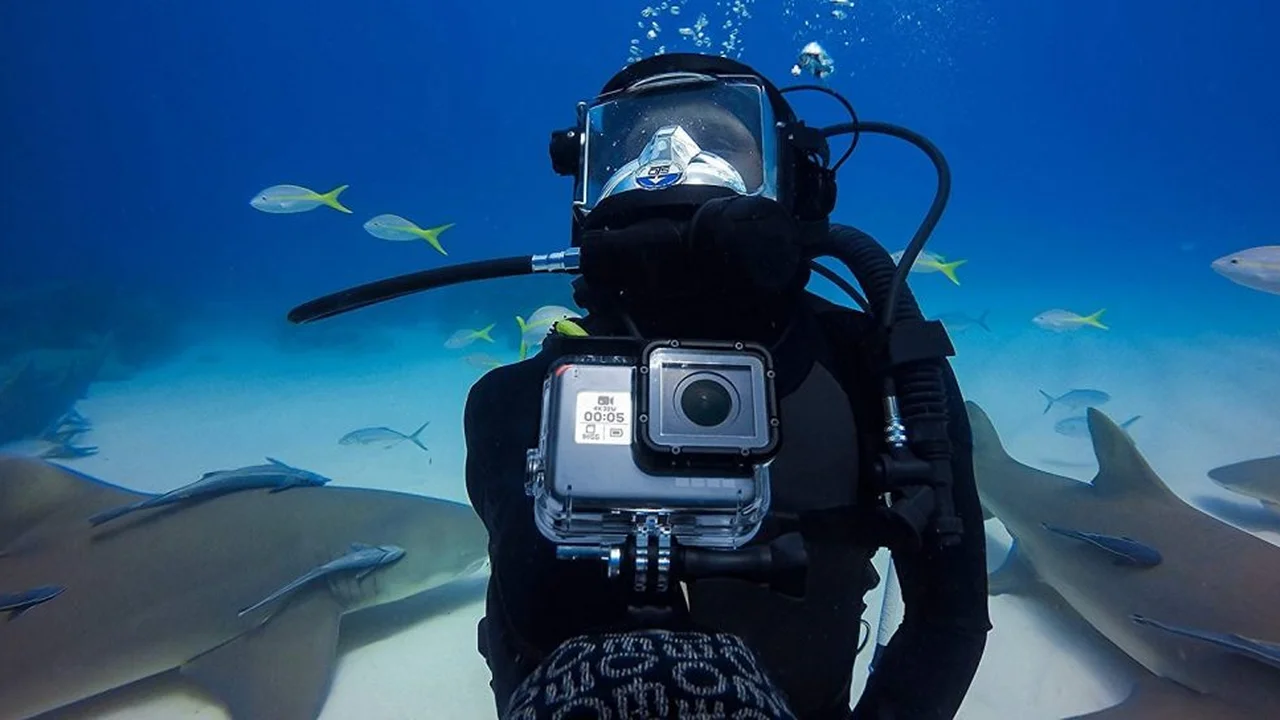
Maximize your GoPro's potential for underwater video and photo with these expert tips.
Scuba Diving with a GoPro Tips and Tricks
Why GoPro for Underwater Adventures
GoPro cameras have revolutionized how we capture our adventures, and scuba diving is no exception. Their compact size, rugged build, and impressive video capabilities make them a favorite among divers, from casual snorkelers to seasoned underwater photographers. But simply owning a GoPro isn't enough; unlocking its full potential underwater requires understanding its features, limitations, and a few essential accessories. This comprehensive guide will walk you through everything you need to know to capture stunning underwater footage and photos with your GoPro.
Compared to traditional underwater camera setups, GoPros offer unparalleled portability and ease of use. You can literally slip one into your BCD pocket and forget about it until you spot that incredible manta ray. They're also significantly more affordable than dedicated underwater camera systems, making high-quality underwater videography accessible to a wider audience. However, their small sensor size and fixed lens mean they have certain limitations, especially in low light or when trying to achieve professional-grade stills. But for capturing dynamic video clips and sharing your diving experiences, a GoPro is an excellent choice.
Essential GoPro Models for Underwater Use
While many GoPro models can go underwater, some are better suited than others. Here's a look at the most popular and capable models for scuba diving, along with their key features and approximate pricing:
GoPro HERO12 Black: The Current King of Underwater Action
The HERO12 Black is GoPro's latest flagship and an excellent choice for serious underwater enthusiasts. It boasts improved battery life, HyperSmooth 6.0 stabilization, and support for external microphones (though less relevant underwater). Its 8:7 aspect ratio sensor allows for more vertical framing, which is great for social media. It's waterproof down to 33 feet (10 meters) out of the box, but for scuba diving, you'll absolutely need the Protective Housing + Waterproof Case.
- Key Features: 5.3K60, 4K120, 2.7K240 video; 27MP photos; HyperSmooth 6.0; GP2 chip; improved battery life.
- Underwater Capability: Waterproof to 10m (33ft) without housing. Requires Protective Housing for deeper dives.
- Approximate Price: $399 - $449 (camera only). Protective Housing: $49.99.
- Use Case: Ideal for divers who want the best video quality, stabilization, and future-proofing. Excellent for capturing fast-moving marine life and smooth cinematic shots.
GoPro HERO11 Black: A Powerful and Cost-Effective Alternative
The HERO11 Black shares many features with the HERO12, including the larger 8:7 sensor and excellent HyperSmooth 5.0. It's still a powerhouse for underwater video and often available at a slightly lower price point than the HERO12, making it a great value. Like the HERO12, it needs the Protective Housing for scuba diving.
- Key Features: 5.3K60, 4K120, 2.7K240 video; 27MP photos; HyperSmooth 5.0; GP2 chip.
- Underwater Capability: Waterproof to 10m (33ft) without housing. Requires Protective Housing for deeper dives.
- Approximate Price: $349 - $399 (camera only). Protective Housing: $49.99.
- Use Case: A fantastic option for divers seeking high-end performance without needing the absolute latest features. Great for capturing vibrant reef scenes and marine encounters.
GoPro HERO10 Black: Still a Solid Performer
The HERO10 Black, while a couple of generations old, still offers impressive performance thanks to its GP2 chip. It shoots 5.3K video and has excellent HyperSmooth 4.0 stabilization. If you can find it at a good discount, it's a very capable underwater camera for most recreational divers. Again, the Protective Housing is a must.
- Key Features: 5.3K60, 4K120, 2.7K240 video; 23MP photos; HyperSmooth 4.0; GP2 chip.
- Underwater Capability: Waterproof to 10m (33ft) without housing. Requires Protective Housing for deeper dives.
- Approximate Price: $249 - $299 (camera only). Protective Housing: $49.99.
- Use Case: Excellent value for divers on a budget who still want high-resolution video and good stabilization. Perfect for capturing general dive footage and sharing with friends.
Essential GoPro Accessories for Scuba Diving
A GoPro alone won't cut it for serious underwater videography. These accessories are crucial for protecting your camera, improving image quality, and making your diving experience smoother.
1. Protective Housing + Waterproof Case: Your GoPro's Best Friend
This is non-negotiable for scuba diving. While GoPros are waterproof to 10 meters (33 feet) out of the box, that's not deep enough for most dives. The official GoPro Protective Housing extends the waterproof rating to 60 meters (196 feet), which covers virtually all recreational diving depths. It also provides an extra layer of protection against bumps and scratches.
- Product: GoPro Protective Housing + Waterproof Case (for HERO9/10/11/12 Black)
- Approximate Price: $49.99
- Why You Need It: Essential for deep diving, protects against impact, and ensures your camera stays dry.
2. Red Filter or Magenta Filter: Bringing Back the Color
Water absorbs light, especially red light, as you go deeper. This is why everything looks blue or green underwater. A red filter (for blue water) or a magenta filter (for green water) helps to correct this color shift by adding red back into your footage, making your videos and photos look much more vibrant and natural without needing extensive post-processing. These typically snap onto your protective housing.
- Product: PolarPro DiveMaster Filter Kit (Red, Magenta, Snorkel) or Telesin Red Filter
- Approximate Price: PolarPro: $79.99, Telesin: $19.99
- Why You Need It: Crucial for accurate color rendition in natural light, especially below 15-20 feet.
3. Dive Lights or Video Lights: Illuminating the Depths
While filters help with color correction, they don't add light. For truly vibrant colors, especially in deeper water or low-light conditions (like under ledges or in wrecks), you'll need a dedicated dive light or video light. These lights restore the full spectrum of colors and can also be used to illuminate subjects for macro shots or to add dramatic flair to your wide-angle footage. Look for lights with a wide beam angle and high lumen output (e.g., 1000-3000 lumens).
- Product: SeaLife Sea Dragon Mini 1300, Bigblue AL1200NP, or OrcaTorch D570V
- Approximate Price: SeaLife: $149.99, Bigblue: $199.99, OrcaTorch: $129.99
- Why You Need It: Essential for bringing back true colors in deeper water, low light, and for macro videography.
4. Tray and Handles: Stable Shots and Easy Handling
Holding a small GoPro by itself can lead to shaky footage. A tray with handles provides a stable platform for your camera and allows you to attach lights, external monitors, or other accessories. This significantly improves stability, making your videos smoother and easier to watch. It also makes the camera setup easier to hold and manipulate underwater, especially with gloves on.
- Product: Fantasea Line FGCP-01 GoPro Tray, Ikelite GoPro Tray with Handles
- Approximate Price: Fantasea: $79.99, Ikelite: $129.99
- Why You Need It: Improves stability for smoother video, provides mounting points for lights and accessories, and enhances ergonomics.
5. Floating Hand Grip or Pole: Don't Lose Your GoPro
Losing your GoPro to the depths is a common fear. A floating hand grip ensures that if you accidentally let go, your camera will float to the surface. Many also double as short extension poles, allowing you to get closer to subjects without disturbing them or to capture unique angles. Look for one with a wrist lanyard for added security.
- Product: GoPro Handler, SP Gadgets POV Pole
- Approximate Price: GoPro Handler: $29.99, SP Gadgets: $39.99
- Why You Need It: Prevents loss of your camera, provides a stable grip, and offers extended reach.
6. Anti-Fog Inserts: Clear Vision
Temperature differences between the inside of your housing and the surrounding water can cause fogging, ruining your footage. Anti-fog inserts absorb moisture and prevent condensation inside the housing. They are inexpensive and can be reused multiple times.
- Product: GoPro Anti-Fog Inserts, Desiccant Packets
- Approximate Price: $9.99 (for a pack of 12)
- Why You Need It: Prevents frustrating fogging inside your housing, ensuring clear footage.
7. Extra Batteries and Charger: Power Through Your Dives
GoPros, especially when shooting in high resolutions, can drain batteries quickly. Always carry at least two or three spare batteries and a dual charger. This ensures you won't miss out on capturing that incredible encounter because of a dead battery.
- Product: GoPro Enduro Batteries, Telesin Dual Battery Charger
- Approximate Price: GoPro Enduro: $24.99 each, Telesin Charger: $19.99
- Why You Need It: Ensures you have enough power for multiple dives and extended shooting sessions.
GoPro Settings for Optimal Underwater Performance
Getting the right settings on your GoPro before you jump in is crucial for maximizing image quality. Here are some recommended settings for underwater video and photos:
Video Settings for Underwater Clarity and Color
- Resolution and Frame Rate:
- 5.3K30 or 4K60: These are excellent starting points. 5.3K offers the highest detail, allowing for cropping in post-production. 4K60 provides smoother motion, especially for fast-moving subjects, and allows for slow-motion playback.
- 2.7K120 or 1080p240: Use these for super slow-motion effects, but be aware of the lower resolution.
- Lens/Field of View (FOV):
- Wide or Linear: Wide is the classic GoPro look, capturing a broad scene. Linear corrects for the fisheye distortion, making lines straight. For most underwater video, Wide is preferred to capture as much of the scene as possible.
- HyperView: Even wider than Wide, good for capturing very large subjects or expansive reefscapes.
- HyperSmooth Stabilization:
- High or Boost: Always keep HyperSmooth on for smooth, cinematic footage, especially when hand-holding. Boost provides the most aggressive stabilization but crops the image slightly.
- Color Profile:
- Flat: This profile captures more dynamic range, preserving details in highlights and shadows. It requires color grading in post-production but gives you the most flexibility.
- Vibrant (GoPro Color): If you don't want to color grade, this profile boosts colors directly in-camera. It's less flexible but quicker.
- White Balance:
- Native: This is generally the best setting when using a red/magenta filter or video lights, as it allows for the most accurate color correction in post-production.
- Manual (e.g., 5500K-6500K): If you're not using a filter or light, you can try manually setting the white balance, but it's challenging to get right underwater.
- ISO Min/Max:
- Min ISO: 100
- Max ISO: 400-800 (Video) / 1600 (Photo): Keep the maximum ISO as low as possible to minimize digital noise, which becomes very noticeable in low-light underwater conditions.
- Sharpness:
- Low or Medium: High sharpness can introduce artifacts. It's better to add sharpness in post-production if needed.
- Exposure Compensation (EV Comp):
- -0.5 or -1.0: Underwater, it's often better to slightly underexpose to preserve highlights and prevent blown-out areas, especially when shooting towards the surface.
- Protune: Always turn Protune ON to access these advanced settings.
Photo Settings for Underwater Stills
- Photo Mode:
- RAW: If your GoPro supports it (HERO10 Black and newer), shoot in RAW. This gives you the most data for post-processing and color correction.
- SuperPhoto: If not shooting RAW, SuperPhoto uses intelligent scene recognition to optimize settings.
- Megapixels: Use the highest available (e.g., 27MP on HERO11/12).
- Burst Mode: Useful for capturing fast-moving subjects. Try 10 photos in 1 second.
- Time Lapse Photo: Great for capturing reef activity over time from a fixed position.
- White Balance, ISO, Sharpness, EV Comp: Similar recommendations as for video.
Tips for Capturing Amazing Underwater Footage and Photos
Settings are just one piece of the puzzle. Your technique and understanding of the underwater environment are equally important.
1. Get Close to Your Subject: The Golden Rule of Underwater Photography
Water acts as a filter, reducing clarity and color the further away you are from your subject. The closer you get, the less water column there is between your lens and the subject, resulting in sharper images with better color. Don't zoom in; physically move closer. This is especially true for GoPros, which have a wide-angle lens.
2. Shoot Upwards: Avoid Backscatter and Enhance Light
Whenever possible, try to shoot slightly upwards towards the surface. This uses the natural light from above, making your subjects brighter and more colorful. It also helps to minimize backscatter (small particles in the water illuminated by your flash or video light), as you're not lighting up the water directly in front of your lens.
3. Maintain Good Buoyancy: Stability is Key
Good buoyancy control is paramount for stable footage and for protecting the reef. Practice hovering motionless in the water. This allows you to compose your shots carefully and avoid bumping into delicate corals or stirring up sediment, which can ruin visibility for your footage.
4. Use a Red/Magenta Filter or Video Lights: Restore Color
As mentioned, these are essential. Without them, your footage will look dull and monochromatic. Experiment with both to see what works best for different depths and lighting conditions.
5. Shoot in Short Clips: Edit with Ease
Instead of recording one long continuous video, shoot in short, focused clips (5-15 seconds). This makes editing much easier and ensures you're only capturing the best moments. Think about the story you want to tell with each clip.
6. Look for Interesting Subjects and Behaviors: Tell a Story
Don't just point and shoot. Look for unique marine life, interesting interactions, or captivating behaviors. A fish cleaning station, a turtle munching on seagrass, or a diver interacting with the environment (responsibly!) can make for much more engaging footage.
7. Clean Your Lens and Housing Port: Prevent Blurry Footage
Before every dive, ensure your GoPro lens and the housing's front port are perfectly clean. Even a small smudge or water droplet can cause blurry or distorted footage. Use a soft cloth and fresh water.
8. Check Your Settings Before Each Dive: Avoid Disappointment
It's easy to forget to change settings between dives or after charging. Always double-check your resolution, frame rate, color profile, and filter before you descend. A quick glance can save you from hours of frustration later.
9. Practice, Practice, Practice: Master Your Craft
Like diving itself, underwater videography takes practice. The more you dive with your GoPro, the better you'll become at anticipating shots, adjusting to conditions, and mastering your camera's controls. Don't be afraid to experiment!
10. Post-Processing: Enhance Your Footage
Even with the best in-camera settings and filters, post-processing can significantly enhance your GoPro footage. Software like DaVinci Resolve (free), Adobe Premiere Pro, or even GoPro's Quik app can be used for color correction, trimming, adding music, and stabilizing shaky clips. If you shot in Flat color profile, this is where you'll bring back the vibrant colors.
Common GoPro Underwater Challenges and Solutions
Challenge 1: Blue/Green Tinted Footage
Cause: Water absorbs red light, leaving only blue/green wavelengths to reach the camera sensor.
Solution: Use a red filter (blue water) or magenta filter (green water) for natural light. For deeper dives or low light, use dedicated video lights to restore full spectrum color. In post-processing, use color correction tools to adjust white balance and saturation.
Challenge 2: Blurry or Unfocused Footage
Cause: Dirty lens/housing port, shooting too far from the subject, or excessive camera shake.
Solution: Always clean your lens and housing port before diving. Get as close as possible to your subject. Use a tray and handles for stability, and ensure HyperSmooth is enabled.
Challenge 3: Backscatter (Small White Dots in Footage)
Cause: Particles in the water (sediment, plankton) are illuminated by your light source (strobe or video light) and reflect back into the lens.
Solution: Angle your video lights slightly away from the camera lens (known as 'raking light'). Avoid stirring up sediment. Shoot slightly upwards to use ambient light. In post-processing, some software can help reduce backscatter, but prevention is best.
Challenge 4: Short Battery Life
Cause: High-resolution video (5.3K, 4K), cold water, and continuous recording drain batteries quickly.
Solution: Carry multiple spare batteries (GoPro Enduro batteries are recommended for cold water). Turn off Wi-Fi and GPS if not needed. Shoot in shorter clips rather than continuous recording. Consider a portable power bank for charging between dives on the boat.
Challenge 5: Fogging Inside the Housing
Cause: Temperature difference between the air trapped inside the housing and the colder surrounding water, causing condensation.
Solution: Use anti-fog inserts inside the housing. Pack your GoPro in a cool, dry environment before sealing the housing. Avoid opening the housing in humid conditions. If possible, cool the camera and housing before the dive.
Final Thoughts on GoPro Underwater Videography
GoPros are incredibly versatile tools for capturing your underwater adventures. While they may not replace professional DSLR or mirrorless setups for high-end still photography, their video capabilities, ease of use, and portability make them an unbeatable choice for many divers. By understanding your camera's settings, investing in the right accessories, and practicing good underwater videography techniques, you'll be well on your way to creating stunning footage that truly brings your diving experiences to life. So, gear up, dive in, and start capturing those unforgettable moments beneath the waves!
:max_bytes(150000):strip_icc()/277019-baked-pork-chops-with-cream-of-mushroom-soup-DDMFS-beauty-4x3-BG-7505-5762b731cf30447d9cbbbbbf387beafa.jpg)